Sonoris Audio Engineering

  Top » Catalog » Standalone » My Account  |  Cart Contents  |  Checkout   
Products
Plugins
Bundles
Standalone
Currencies
Login Here
E-Mail Address:
Password:


Password forgotten?
New customer
Subscribe to Newsletter


Information
Shipping & Returns
References
Reviews
Support
License Agreement

Sonoris DDP Creator

€229

Option:  Download

Formats

Windows Mac OS X

Both formats are included in one purchase

Description

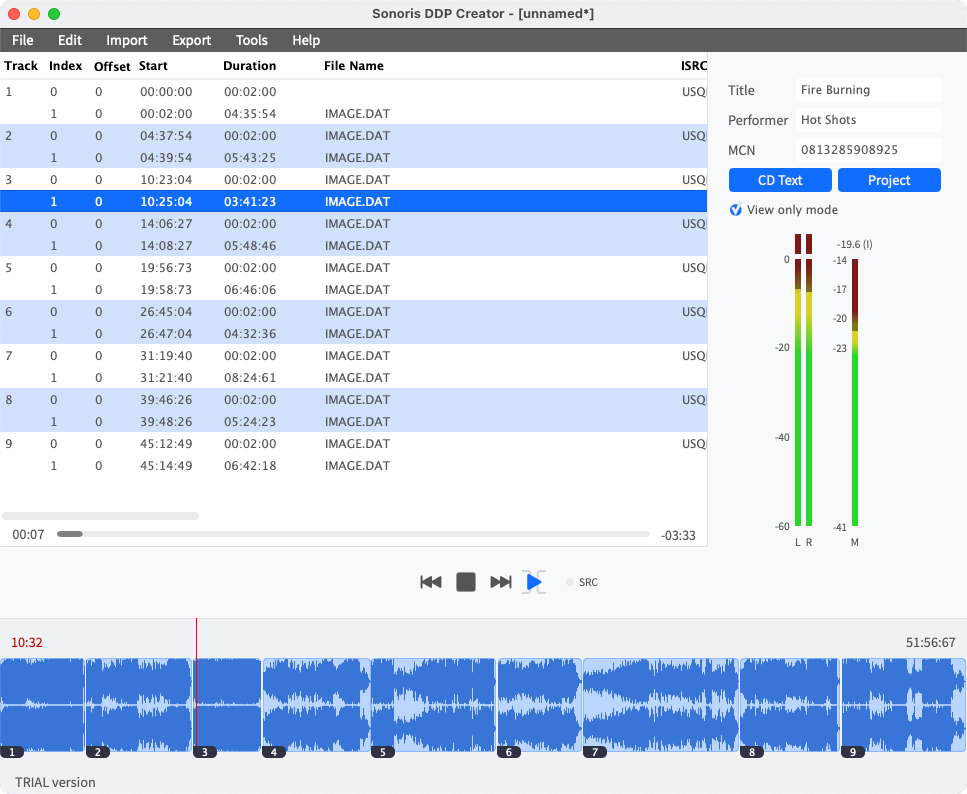
The Sonoris DDP Creator is a standalone cross-platform CD authoring application compatible with virtually any DAW software on the market. The DDP Creator lets you assemble professional RedBook compatible audio CD's and supports the import and export of DDP 2.00 images and Cue Sheet (cue) files. It also enables you to burn and rip audio CD's and send off images with FTP.

CD authoring

With the DDP Creator you can assemble a RedBook compatible CD by just dropping wav or aif files on the workspace and set the track order. After that you can adjust the spaces between tracks and audition this by playing back the transition from one track into another. Then edit the PQ points, ISRC, MCN and CD-Text data. Finally export to DDP, Cue Sheet or CD and print a PQ sheet if needed.

DDP export

The main feature of the DDP Creator is the export of the CD project to a DDP 2.00 fileset. The industry standard DDP protocol is supported by all major CD replication plants and ensures an error free transfer and manufacturing of your masters. No more need to burn a physical master CD any more!

DDP import (loadback)

Besides DDP export the DDP Creator can import (loadback) a DDP fileset too, including DDP images made by other software, like Sonic Studio HD, SADiE, Sequoia or Pyramix. This feature allows you to check the project including all PQ codes, ISRC, MCN and CD-Text data. You can edit the project, playback tracks and export to DDP, Cue Sheet or burn a Redbook compatible CD from it.

Compatibility

Most DDP software packages or add-ons are very expensive, but the DDP Creator is competitively priced. Together with the powerful import features it is the perfect choice for everyone who needs a professional CD authoring and DDP solution without the need to switch to another DAW software. For example, you have assembled a CD in your favorite audio editor but need to deliver a DDP fileset? Simply add audio files or use one of the powerful import features like Cue Sheet files from Wavelab or Pyramix .pmi files or rip a CD and then export the project to DDP.

Features:

  • Supporting .wav, .aif and .flac files
  • Re-ordering of tracks
  • Add/edit ISRC, MCN and CD Text per track and/or for the project
  • Add/edit track indices, even on the fly during playback
  • Continuous playback of tracks
  • Adjust and playback transitions between tracks with pre-roll
  • Export DDP 2.00 image files
  • Import DDP 2.00 image files (loadback)
  • Cue Sheet (cue) support
  • Pyramix .pmi CD image support
  • Audio CD burning
  • Audio CD import (ripping)
  • Data CD/DVD burning
  • MD5 checksum files automatically created
  • RedBook compliance checking
  • PQ Sheet pdf export
  • FTP uploading of DDP images

Feature comparison

System requirements Windows:

  • Windows 2000 or higher

System requirements Mac:

  • Mac OSX 10.4 or higher
  • X11 installed (default on most Mac machines)
  • Processor type Intel needed for CD burning functions

Current limitations:

  • CD Audio import does not handle index 0
  • CD Audio burning does not allow burning audio in an index 0 entry
These limitations will be taken care of in a future update.

Download

ALL SOFTWARE SALES ARE FINAL. WE THEREFORE RECOMMEND DOWNLOADING THE FREE DEMOS BEFORE MAKING A FINAL PURCHASE DECISION.

DOWNLOAD DEMO

This product was added to our catalog on Thursday 04 December, 2008.
Powered by osCommerce
